Cygen: The Versatile Presentation Template for Modern Creators
In a world where ideas need to be communicated quickly, clearly, and with visual impact, your presentation deck is often your most important tool. Whether you’re pitching to investors, showcasing your agency’s portfolio, or teaching a complex concept, the framework you use can make or break your message. Presentation Template - Cygen isn’t just another set of slides; it’s a designed system built for adaptability, offering a foundation upon which a wide variety of stories can be told.
A Foundation Designed for Flexibility
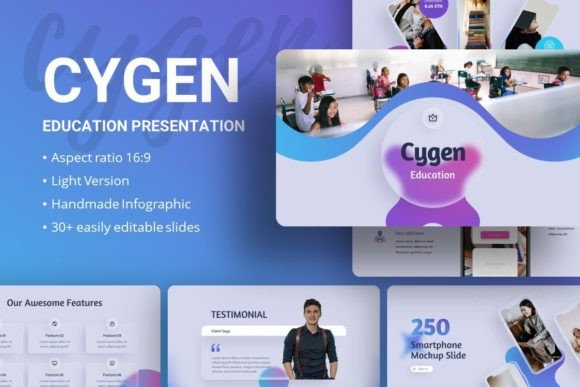
What makes Cygen interesting is its core intention: to serve many masters without looking generic. With 35 slides per template, it provides a substantial library of starting points, from title pages and content layouts to specific infographics and data visualization frames. Each slide is built on master slides, ensuring that changes to fonts, colors, or backgrounds propagate consistently throughout your entire presentation, saving you hours of manual adjustment. This isn’t a locked-in aesthetic; it’s a structured canvas.
The practical features speak directly to the needs of real users. Pixel-perfect illustrations and handcrafted infographics ensure a professional baseline quality. Every graphic is resizable and editable directly within PowerPoint, allowing you to tweak shapes, colors, and sizes to match your brand. The inclusion of picture placeholders with drag-and-drop functionality means swapping in your own photography—from Unsplash, Pexels, or your own camera—is intuitive and fast. Cygen provides the architecture; you bring the content and personality.
Creative Applications Beyond the Expected
The listed uses—Creative Agency, Company Profile, Portfolio, Pitch Deck—are just the beginning. The true creative possibility lies in interpreting the template through your specific lens. Consider these applications and adaptations:
For Educators and Trainers
An educator can transform Cygen into a compelling learning module. The clean typography based on Amaranth and Josefin Sans fonts aids readability. Use the infographic slides to break down complex processes into step-by-step visual flows. Replace the demo images with relevant diagrams, historical photographs, or charts. The consistent layout helps students follow the material, while the editable nature allows for adding interactive elements like QR codes or discussion prompts directly onto the slides.
For Freelancers and Personal Branding
A freelancer’s portfolio presentation is often their first interview. Cygen’s structure can be adapted to tell a personal career story. Use the sequential slides to showcase “Case Study Journeys”: start with the client problem (using a problem statement slide), move through your process (using infographic or timeline slides), and culminate in the results (using data and comparison slides). This turns a simple portfolio into a narrative of your problem-solving ability, making it far more engaging than a static PDF.
Adapting Style for Audience and Context
The key to effective use is aligning the template’s potential with your audience’s needs. A pitch deck for startup investors requires a different rhythm than a corporate report. Here’s how to steer Cygen for different contexts:
- Startup Pitch Deck: Focus on the slides built for clarity and impact. Use the strong title slides to state your value proposition boldly. Employ the comparison or “before and after” infographics to illustrate market disruption. Keep the design lean—replace placeholder images with high-contrast, simple visuals that underscore your innovation. The goal is confidence and clarity.
- Creative Agency Profile: Here, mood is crucial. Use the template’s clean frames to let your agency’s work shine. Swap in your best project imagery. You might modify the color palette of the template’s editable graphics to match your brand’s signature color, creating a seamless experience from template to content. The presentation itself becomes a testament to your design sensibility.
- Internal Corporate Report: For this, prioritize data clarity and organizational flow. Utilize the master slide functionality to create a custom corporate color theme. The handcrafted infographics are perfect for visualizing quarterly results, project timelines, or organizational charts. Consistency, created through the master slides, reinforces a sense of order and professionalism for internal stakeholders.
Keeping Results Original and Audience-Friendly
While the template provides the structure, your content provides the originality. Avoid simply filling in the blanks. Use the easy customizable contents as a guide, not a prescription. Rearrange slide order to suit your narrative flow. Combine elements from different slide types—perhaps bringing an infographic element into a simpler text slide for visual interest. Always ask: “Is this slide serving my audience’s understanding?” If a slide feels redundant or confusing, customize it or cut it. The included documentation file is your guide to making these technical customizations smoothly.
From Inspiration to Finished Presentation
The journey from downloading the .PPTX file to presenting your idea should be straightforward and creative. Begin by exploring the 35 slides to understand the available components. Next, define your core message and audience. Then, map your narrative onto the slides, selecting the layouts that best serve each part of your story. This is where the creative work happens: choosing imagery, tailoring text, and possibly adjusting graphic colors.
A practical recommendation is to start with a “copy deck.” Duplicate the original Cygen file, and within this copy, perform your brand adaptations on the master slides first—set your fonts, your color palette, your logo placement. This upfront work ensures every new slide you add maintains consistency. Then, proceed with content population, using the drag-and-drop image placeholders and editable text boxes. This method balances creative freedom with organizational efficiency.
Presentation Template - Cygen succeeds because it respects both design principles and user pragmatism. It offers a professional baseline that eliminates the fear of starting from a blank slide, yet its editable, resizable, and master-slide-based architecture invites you to imprint your own identity onto it. For the marketer, it’s a campaign storyboard. For the blogger, it could be a visual lecture. For the entrepreneur, it’s the foundation of a compelling pitch. Its utility is defined not by its predefined slides, but by the countless ways a creative professional can adapt, interpret, and apply it to communicate their unique idea with clarity and impact.