Google Slides - Alignify: A Foundation for Purposeful Presentations
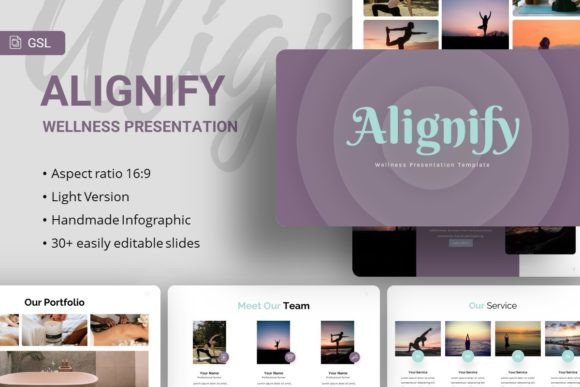
In the landscape of digital communication, a presentation is more than just slides; it’s a narrative tool. Google Slides - Alignify enters this space as a thoughtfully designed template system, but its true value lies in how it serves as a springboard for clarity and intention. It is a collection of 35 slides, built on master slides for consistency, featuring handcrafted infographics and pixel-perfect illustrations. Yet, what makes it genuinely useful is not just its technical features—like resizable graphics, picture placeholders, and easy customization—but its inherent flexibility. It’s a structured starting point designed to be molded for a multitude of purposes, from corporate profiles to personal portfolios.
Beyond the Template: The Principle of Alignment
The name ‘Alignify’ suggests a core creative principle: alignment. In design, this refers to visual order; in communication, it means aligning your message with your audience’s needs. This template provides the visual framework—the grids, the typography using Karla and Raleway fonts, the balanced layouts—that makes achieving that principle practically easier. It removes the initial friction of building a slide deck from absolute scratch, allowing you to focus immediately on what you want to say and why. For a creative agency, this might mean aligning a pitch deck with a client’s brand ethos. For an educator, it could mean structuring a lesson for maximum student comprehension. The template supports that alignment process by being clean, adaptable, and professionally grounded.
Creative Applications and Interpretations
The listed uses—Creative Agency, Company Profile, Corporate Business, Portfolio, Photography, Pitch Deck, Startup, Personal Portfolio—are launch pads, not limits. Consider how different creators might interpret the same slide structures:
- A marketer or blogger could adapt the infographic slides to visualize content strategy or annual review data, transforming abstract plans into compelling narratives for their audience.
- An entrepreneur or small business owner might use the master slide layouts to maintain brand consistency across different presentations: one for investor pitches, another for internal team briefings, all sharing a coherent visual language.
- A freelancer or hobbyist crafting a personal portfolio could leverage the photography-friendly placeholders and minimalist design to let their work—be it writing, design, or art—take center stage, with the template providing a quiet, elegant stage.
The included documentation file is a practical key to these adaptations, guiding users through customization without locking them into a single style.
Adapting for Audience and Context
The effectiveness of any presentation hinges on its audience. Google Slides - Alignify, with its editable nature, encourages this audience-first thinking. For a formal corporate audience, you might use the more structured slides, employ a restrained color palette, and focus on the data-driven infographics. For a creative or startup audience seeking inspiration, you could amplify the visual components, use the resizable illustrations more dynamically, and integrate high-impact imagery from sources like Unsplash or Pixabay (remembering the demo images are for preview only). The template’s foundation in Google Slides means accessibility and collaboration are baked in; a team can co-edit a deck for a client, or an educator can share a presentation seamlessly with students.
Maintaining Clarity and Originality
Starting with a robust template can sometimes lead to generic outputs. The challenge—and the creative opportunity—is to inject originality while maintaining the template’s core clarity. Here are some practical recommendations:
- Use the Master Slides as Your Rulebook: They ensure typography and element placement remain consistent. Stick to them for foundational elements to maintain professional cohesion.
- Customize with Purpose: Change colors to match your brand, replace placeholder text with your authentic voice, and select imagery that directly supports your message. The drag-drop picture placeholder feature makes this experimentation fluid.
- Edit for Flow: You don’t need to use all 35 slides. Curate them. Sequence the slides to build your narrative. Perhaps use a bold introductory slide from the template, followed by a series of clean content slides, culminating in a powerful infographic summary.
This approach ensures your final presentation feels uniquely yours, yet organized and audience-friendly, avoiding the common pitfall of template-filled slides that feel disconnected from the speaker.
From Foundation to Finished Project: Realistic Pathways
Let’s ground this in realistic project ideas. Imagine a designer using Google Slides - Alignify not just for a client pitch, but to create a public-facing case study on their website. They could export key slides as images or PDFs, embedding them in a blog post to showcase their process. An educator or trainer could build an interactive workshop deck, using the clear layouts for instructions and the infographic slides for summarizing group feedback live during the session.
The vector icons and resizable graphics are particularly useful for those without deep design software skills, allowing for the creation of custom diagrams or simplified logos directly within the presentation environment. This empowers creators to produce work that feels polished without requiring external tools.
Balancing Inspiration with Practical Constraints
While inspiration suggests endless possibilities, practical guidance acknowledges constraints like time, skill, and purpose. This template balances both. It inspires by offering a clean, modern canvas that suggests professional outcomes. It provides practical aid through its predefined structures, which speed up production and reduce design anxiety. For the publisher rushing to produce a press kit, or the freelancer needing a portfolio update before a job application, this practical aspect is crucial. The template delivers a result that looks intentional, which in itself can inspire confidence in the presenter and trust from the viewer.
Ultimately, Google Slides - Alignify and its Wellness variant are tools for effective communication. Their utility is proven not when they are used as-is, but when they are used as a foundation upon which a clear, aligned, and purposeful message is built. They encourage the user to think first about their story and their audience, then to leverage a flexible, well-crafted system to bring that story to light. Whether your goal is to secure funding, share your art, teach a concept, or profile your company, this approach—starting with alignment and supported by adaptable design—is a pathway to presentations that resonate.